
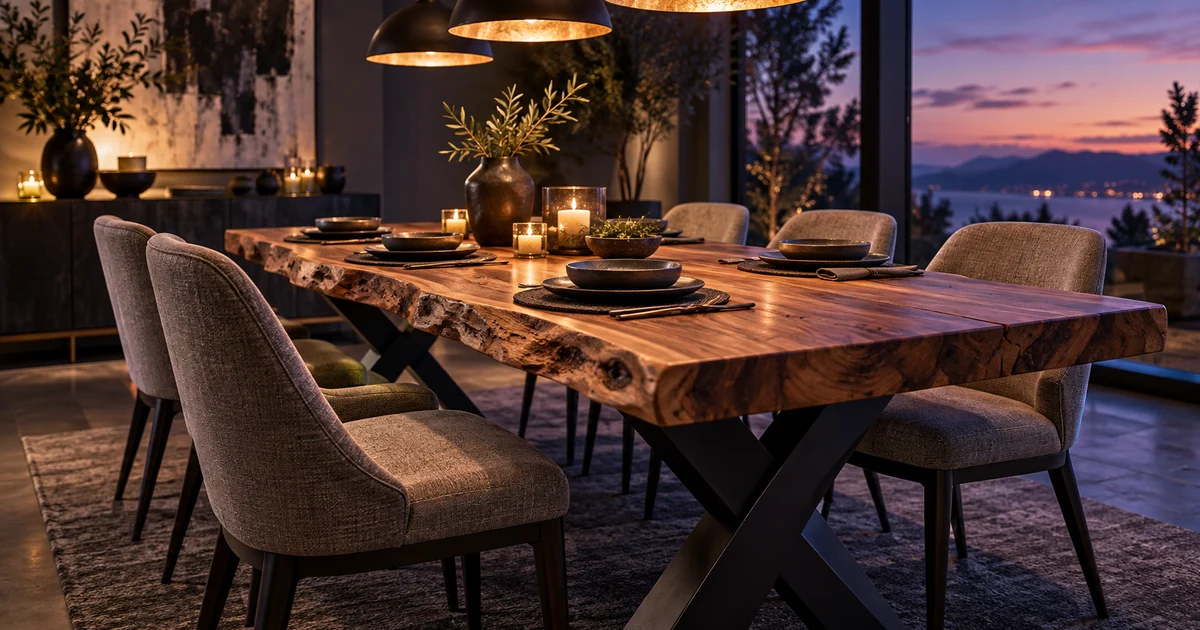
Furniture sells on three things a still photo struggles to show: scale, material and how a piece looks in a room. Short AI video can show all three, if the format matches the piece. Use TV Spot for statement pieces, Hyper Motion for texture (velvet, bouclé, wood grain) and UGC or Review for affordable everyday pieces. Skip Unboxing for flat-pack. Then check every clip against the product page before it goes live: AI models can quietly stretch a table, add a leg or shift a velvet's shade.
Why furniture needs video more than most categories
A shopper can't sit on a chair through a screen. They're trying to answer three questions from your photos:
- How big is it, really? Will the table seat six? Will the sideboard fit under the window?
- What is it made of, and what will it feel like? Is the velvet soft or shiny? Is the oak warm or grey?
- Will it look right in my room?
Photos answer these badly, because furniture is three-dimensional and material-led. A slow camera move along a table edge shows its length against the chairs. Light moving across velvet shows its nap. A drawer sliding open shows the runners. And because returning a sofa is far more painful than returning a T-shirt, for the customer and for you, every doubt a video removes before the order is worth more here than in most categories.
Match the format to the piece
v4v Studio has seven formats. Here is how the five that suit furniture map onto a home decor catalogue:
| Piece | Format | Why | Shot to ask for |
|---|---|---|---|
| Statement pieces: dining tables, sideboards, beds, anything with a high price | TV Spot | Premium and slow, with no creator talking to camera, which matches how these pieces are sold | A slow dolly along the table edge at dusk; the camera rising to reveal the full set table |
| Textured upholstery: velvet and bouclé chairs, sofas, headboards | Hyper Motion | Macro and movement show the material | A hand brushing velvet so the nap changes shade; a cushion pressed and springing back |
| Affordable everyday pieces: side tables, mirrors, lamps, shelving | UGC or Review | A relatable person in a real room answers "will it work for me?" | Handheld "my small-flat fix" walkthrough |
| Small decor and gifts: cushions, throws, vases | UGC or Unboxing | Low price and impulse buys; gift season | Cushions tossed onto a sofa; a throw unfolded |
| Flat-pack furniture | Not Unboxing | A flat box isn't a reveal | Show it assembled and in use instead |
Three prompts you can paste
In Studio you choose the product (paste its URL or upload photos), the format, and optionally an avatar. The prompt is the creative direction: what the camera does, the room, the light. Here are three starting points, one per main format.
1. Statement dining table: TV Spot, 16:9 for the product page or 9:16 for Reels
Slow cinematic dolly along the live edge of a light acacia dining table with a clear glass river channel down its centre and a black cross-frame base. Moody dusk dining room, warm lamp light. Candle flames reflect and glint through the glass river as the camera glides low along the natural wood edge. Hands set a dark stoneware plate and pour red wine into a glass. Camera rises to reveal the full table set for dinner with dark upholstered chairs. Quiet, warm, slow; soft ambient room tone and a gentle wine pour, no music, no text.
2. Velvet dining chair: Hyper Motion, 9:16
Macro shot of a hand slowly brushing across the seat of a green velvet dining chair with solid oak legs; the velvet nap shifts from light to dark green under soft window light. Quick cuts: the curved backrest in profile, the oak leg grain up close, the chair pulled out from a pale oak dining table. Bright Scandinavian dining room, natural daylight. Crisp, tactile, satisfying fabric sound, no text.
3. Festive cushions: UGC, 9:16
Handheld phone-style video: a woman in a cosy knit jumper drops three festive cushions onto a grey sofa, plumps one, and holds it up to the camera with a smile. Living room with a softly lit Christmas tree in the background. Natural indoor light, casual and warm, she says one short line about how they finish the room.
Change the materials, colours and room to match your product, and keep one camera idea per clip. Studio videos are up to 10 seconds, so a prompt that asks for five scenes will rush all of them. More patterns for other categories are in our prompt library.
Photos in, video out: which product images work
The video can only be as accurate as the photos it starts from.
- Room-set photos (the piece styled in a room) are often the best input for TV Spot. The model keeps the light, the mood and, most importantly, the scale against the floor, walls and other furniture.
- Cut-outs on white give the model freedom to build a room, but they also give it room to get the scale wrong. Add the dimensions to the product description so the brief carries them.
- More angles are better. A back view, a leg close-up and an open-drawer shot help the model get the parts right that a single front photo hides.
Our reference image explainer covers how reference photos guide generation.
The accuracy checks (don't skip these)
AI video is good at mood and motion. It isn't guaranteed to keep a product's exact geometry. Before a furniture clip goes on a product page or into an ad, check it against the listing:
- Proportions: is the table still the same length relative to its chairs? Is the sideboard still two doors and two drawers?
- Parts: the number of legs, the handle style, the leg colour (light vs dark is often a separate variant), the base shape.
- Colour and material: velvet shades drift easily, and so does wood tone (light acacia vs oak vs walnut). Compare against your own photo, not against memory.
- Staging: lamps, vases and plates in the scene imply they're included. If your photos say "styling not included", the video's copy should too.
- No AI-generated claims on screen: keep dimensions, materials and prices in your own copy, not in text the model draws into the video.
If a clip fails any check, regenerate it. Don't publish it. A beautiful video of the wrong table creates exactly the return you were trying to prevent.
Where to use the videos
- Product pages: 16:9 for a wide piece like a dining table or a sofa, placed as the first or second item in the product media. On Shopify, the v4v app publishes an approved clip to the product's media in one click. Our Shopify product page guide covers the other methods.
- Homepage hero: the TV Spot clip of your centrepiece product.
- Reels and Stories ads: 9:16 versions. Our Facebook Reels ads guide has the specs and safe zones.
- Seasonal pushes: UGC cushions and throws in November and December; garden furniture in spring.
What it costs
On the web, v4v credit packs start at $7, with no subscription, and credits never expire. On Shopify, the free plan includes three videos on install, enough to try your best-selling piece in three formats. Large catalogues can use the Catalog Pack: $999 one-time for 25 approved product-page videos of your best-sellers. You review a gallery and pay only for the videos you approve, with one redo per product included.
Start with the piece you already feature on your homepage. It's the one your customers are already looking at, and the one most worth showing properly.
Paste a product link. The brief builds itself.
Generate product videos, UGC-style ads and hooks in about 5 minutes.
From $7 · no subscription, ever · credits never expire
FAQs
Can AI make accurate product videos of furniture?
Yes, if you start from good product photos and check every clip before publishing. AI video models can quietly change proportions, leg counts, handles or a fabric's shade, so compare each clip with the product page and regenerate any clip that misrepresents the piece.
Which video format works best for furniture ads?
Match the format to the price and the material. TV Spot suits statement pieces like dining tables, sideboards and beds. Hyper Motion suits textured upholstery like velvet and boucle. UGC or Review suits affordable everyday pieces. Unboxing rarely suits flat-pack furniture.
Can I use my room-set photos to make the video?
Yes, and they are often the best starting point. A styled room photo gives the model the light, the mood and the scale. A cut-out on white gives it more freedom, but also more room to get the scale wrong.
How long should a furniture product video be?
Up to 10 seconds per clip, which is what v4v Studio makes. That's enough for one camera move and one detail. For a sofa or a storage piece, make several short clips (the overall look, the fabric, the drawers or mechanism) rather than one long video.
Can someone make the videos for me?
Yes. The v4v Catalog Pack is done for you, at $999 one-time for 25 approved product-page videos of your best-sellers. You review a gallery and pay only for the videos you approve.